Security
Ripplo tests your app's user workflows against a dev environment. This page explains what access Ripplo has and what it stores.
Last updated October 26, 2026
Application access
Ripplo runs against your application's staging or pull request preview environments.
Ripplo as your identity provider
Every Ripplo run signs in with its own user, which prevents collisions and lets Ripplo test your application at scale. This also means Ripplo does not use shared test accounts and never needs to store passwords for test users.
To do this, set Ripplo as an identity provider for your development or staging environments. We strongly recommend not connecting Ripplo to any production environment.
- Ripplo test users are created as
ripplo-<run id>@test.ripplo.ai. Ripplo issues that user's sign-in exactly once, as part of the run. After that, the user cannot sign in again. - The sign-in token carries a
ripplo_test: trueclaim, which lets your app manage these test users differently.
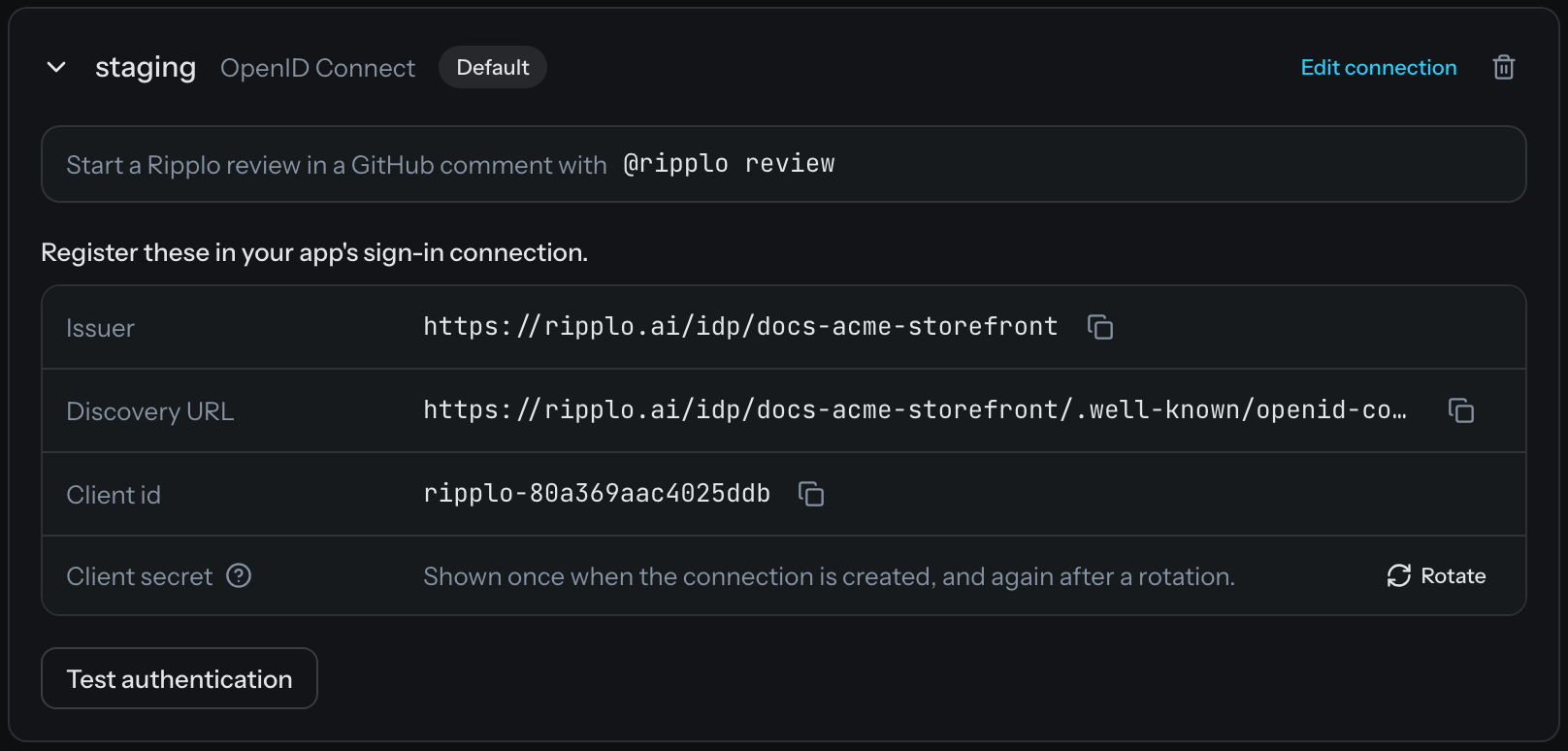 The sign in with Ripplo connection in the Ripplo dashboard
Test data
Ripplo creates and manages its own test data through your app's APIs via its generated users. After the run completes, Ripplo tears down any data created as part of the workflow. If your app supports SCIM, Ripplo also deletes the test user itself.
Data access
What Ripplo stores
- Your account and billing details.
- Your workflows: the click paths Ripplo wrote for your app, stored as code.
- The findings: the issues a review raised.
- A replay of each run: the pages as they rendered, played back like a video, with console messages and network calls.
- The reviewer's log: the steps it took and the code it read.
Replays never capture request headers or cookies. In captured request and response bodies, credential fields such as passwords, tokens, and API keys, and anything shaped like a JSON Web Token, are replaced before storage. Page text and console messages are stored as they appeared.
Where Ripplo stores data
The database, replays, and reviews are all on AWS (us-east-1). All of it is encrypted in transit and at rest. Replays are served through signed links that expire after 2 hours.
Project secrets, such as the sign-in client secret, are additionally encrypted at the application layer with AES-256-GCM before being written to the database. The encryption key is stored separately from the database and is versioned to support key rotation.
Outside services that handle your data
| Vendor | Purpose | Location | Added |
|---|---|---|---|
| Railway | Backup copy of the database, to be deleted by December 2, 2026 | United States (US East) | Oct 20, 2026 |
| Cloudflare | DNS for ripplo.ai, and a backup copy of replays, to be deleted by December 2, 2026 | North America (East) for the backup, global network for DNS | Oct 20, 2026 |
| Amazon Web Services | Hosts the server, database, and replays, runs each review on a temporary copy of your repository, deleted when the review ends, and runs the browsers that test your app | United States (us-east-1) | Oct 20, 2026 |
| OpenRouter | Routes requests to the model providers below | United States | Oct 20, 2026 |
| Fireworks AI | Hosts open-weight models, including DeepSeek, on its own servers | United States | Oct 22, 2026 |
| DeepInfra | Hosts open-weight models, including DeepSeek, on its own servers | United States | Oct 22, 2026 |
| Microsoft Azure | Runs OpenAI models | United States or European Union | Oct 22, 2026 |
| Amazon Bedrock | Runs Anthropic models | United States or European Union | Oct 22, 2026 |
| Better Stack | Server logs, with no prompt text | European Union (Germany) | Oct 20, 2026 |
| PostHog | Dashboard analytics | United States | Oct 20, 2026 |
| Stripe | Billing | United States | Oct 20, 2026 |
| GitHub | Sign-in, the GitHub App, webhooks, and PR comments and checks | United States | Oct 20, 2026 |
Ripplo posts a new outside service here at least 10 business days before it starts handling your data.
AI models
Ripplo sends your data to a model in four places:
- Reviews. The reviewer reads your source code, the pull request's title, description, and changes, the tests Ripplo wrote, and comments people leave on the review. It also reads run replays: page text and structure, screenshots, console messages, and network calls, with credential fields replaced as described above. What it reads goes to the model in its prompts.
- Failure summaries. When a run fails, Ripplo sends a short digest of the run's replay to write one sentence on what went wrong.
- Coverage titles. Ripplo sends a coverage review's brief to name the review.
- Issue search. Ripplo sends the text of each issue to an embedding model so you can search issues. Organizations that use their own model endpoint get keyword search, and no issue text is sent.
Ripplo sends model requests only to OpenRouter, which routes them to four providers: Fireworks AI, DeepInfra, Microsoft Azure, and Amazon Bedrock. OpenAI models run on Microsoft Azure, Anthropic models on Amazon Bedrock, and open-weight models on Fireworks AI and DeepInfra. Ripplo sends no data to any model company's own API, including OpenAI, Anthropic, and DeepSeek.
Every request Ripplo sends to OpenRouter tells it to use only providers that do not store or train on prompts. All four providers run with zero data retention, and none of them uses your code or run data for training. Ripplo does not train models on your data either.
You can choose which of these providers your organization's reviews use, for example only OpenAI and Anthropic, with no DeepSeek or other open-weight models. You can also run reviews on your own model endpoint instead. Email mail@ripplo.ai to set up either.
Data retention
Ripplo keeps your data, including workflows, review results, replays, and reviewer logs, until you close your organization or ask us to delete your data. To delete specific data, email mail@ripplo.ai. Deleting your organization from the dashboard deletes its records, replays, and reviewer logs.
Code access
You install the Ripplo GitHub App on the repositories you choose. These are the permissions it asks for, as GitHub names them. None of them can change your code.
| Permission | Access | Why Ripplo asks for it |
|---|---|---|
| Contents | Read | To read your code and find the user workflows a change touches. |
| Pull requests | Read | The title, commits, and state of a pull request. |
| Deployments | Read | To know when a pull request preview has deployed. |
| Issues | Read and write | To post Ripplo's comment on the pull request, and to create a GitHub issue when you ask for one from the dashboard. |
| Checks | Read and write | To post the review's result as a check on the commit. |
| Metadata | Read | Required by GitHub on every app. |
| Email addresses | Read | To sign you in to Ripplo with GitHub. |
To revoke all of the permissions above, uninstall the app from your organization's GitHub Apps settings.
Project access and environment management
A project is visible only to members of your organization. Ripplo has three types of users: members, admins, and owners.
- Members can see the project, start reviews and coverage, triage findings, and change review settings such as reviewing every push.
- Admins can do everything members can. They can also manage environments, sign-in connections, the GitHub connection, and billing.
- Owners can do everything admins can. They can also delete the organization, which deletes all of its stored data.
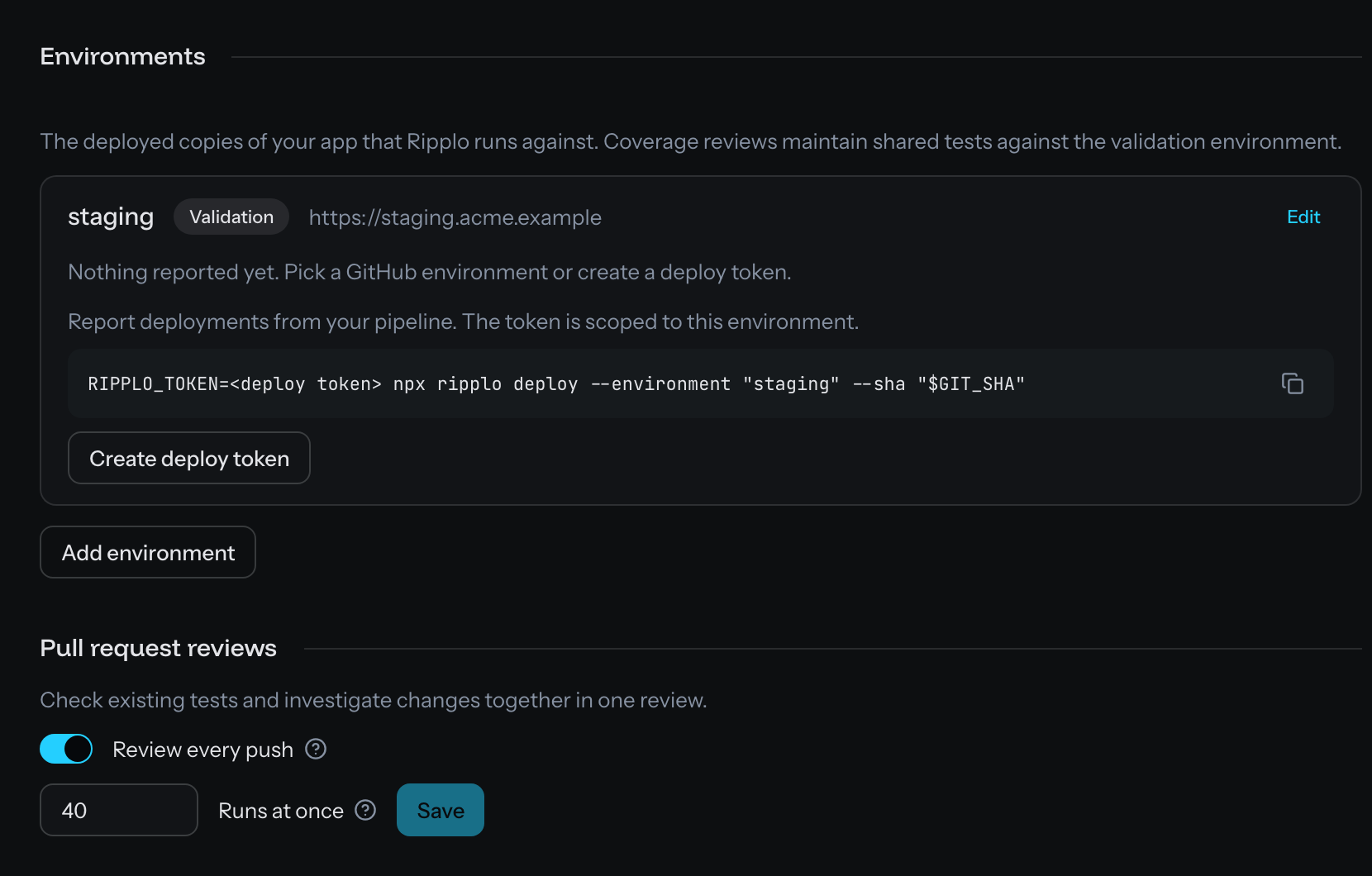 The environment settings for a project
Incidents and contact
If a security incident affects your data, we will email all of the owners on your organization within 72 hours.
Vulnerabilities and security questionnaires go to mail@ripplo.ai, also listed at ripplo.ai/.well-known/security.txt.